Introduction
Word documents are everywhere. In domains such as legal, finance, and healthcare, the Word document is the deliverable. Contracts, regulatory submissions, and audit reports get drafted, redlined, and signed in .docx, and companies usually have libraries of Word templates they work with on a regular basis.
That work is increasingly shifting to agents. Microsoft Copilot and Claude in Word have made in-document AI mainstream, while a growing number of vertical agents; particularly in legal tech—need to interact with .docx files.
However, AI agents are still struggling to do great work in Word documents.
We spoke with dozens of software engineers, mostly in the legal tech and health care spaces, who said they spend weeks and even months tuning their harnesses to edit Word documents reliably, and now are forced to maintain very complex in-house solutions.
In general, there exist several ways for agents to edit Word docs today, which mainly fall into three categories:
- Letting agents write code that uses low-level SDKs such as python-docx / aspose / Open XML SDK.
- Connect MCPs such as SuperDoc, Office CLI, safe-docx or Adeu that provide opinionated tools for the agent.
- Round-trip the Word document through a lossy projection i.e. convert to Markdown/HTML using something like pandoc/mammoth.js, let the agent edit it and convert it back to .docx.
The current solutions work on simple cases, but they fall short when it comes to complex scenarios.
Before diving deep into the solutions and their drawbacks, let’s first understand what a .docx file is.
Problem
A .docx file is essentially a ZIP file with a hierarchy of XML files following the OOXML (Office Open XML) spec. Inside the ZIP, there are the following files: document.xml contains the main text, styles.xml defines reusable styles (kind of like a CSS stylesheet), numbering.xml defines list/numbering behavior, and separate XML files store headers, footers, footnotes, relationships, media, and document metadata.
These XML files are quite verbose. For example, in document.xml, even a short 4–5-sentence paragraph can turn into thousands of tokens once you add styles, metadata, formatting information, run splitting, and XML boilerplate. The text users see in Microsoft Word might be split across many XML nodes and might be persisted in a very verbose manner.
Here's an interactive widget that shows how a simple .docx file works behind the scenes:
This nature of DOCX editing makes it different and trickier from editing code or HTML. With simple files, the text representation is mostly the thing itself and changes are local.
If we take Markdown/simple HTML for example, the structure is at least familiar and styles are local.
This problem gets much worse for vertical AI agents.
Companies like Harvey have already run into it. When they rebuilt their document editing system, the diagnosis they landed on was that they'd been asking one agent to be both a legal assistant and a Word state machine at the same time.
An agent like Harvey's already has a hard job. It has to read the counterparty's redlines, apply the firm's playbook, check that a defined term means the same thing in clause 3 as it does in clause 27, and catch that the indemnification cap it just changed contradicts the liability section two pages up. That's the work. Splitting runs and chasing numbering references is not, but it competes for the same context window.
Status quo
Going back to the solutions above, each of them have different trade-offs, but they all land in the same place: the agent spends its context budget on Word mechanics instead of the actual task.
Low-level libraries (python-docx, aspose, Open XML SDK)
- Good: intuitive for the agent - these libraries are in the pre-training data. They provide full expressiveness; usually nothing is off-limits.
- Bad: slow and expensive. An agent working on a long legal document spends most of its time writing and debugging scripts, and simple things like a hyperlink or a tracked change require the agent to do backflips.
MCP servers (SuperDoc, Office CLI, safe-docx, Adeu)
- Good: fast and cheap compared to writing code.
- Bad: each one is a new DSL the agent has to learn on the fly, from a large surface of tools and options. And they tend to cover the common 80% - the remaining 20% is where real documents live.
Round-tripping (DOCX ↔ Markdown/HTML)
- Good: the agent doesn't have to think about Word at all. It just edits text.
- Bad: the conversion is lossy in one direction and can't be undone in the other. Markdown in particular can't express the style relationships a document inherits from its template.
Of all these approaches, we believe in the third one - round tripping. We believe that by liberating agents from thinking about Word, they can perform better on their tasks.
However, a big problem with round-tripping is - how do you create a lossless conversion?
Solution
Before explaining how the reconciler works, we want to say why we're so bullish on this shape of solution. The inspiration comes from the Infrastructure as Code world.
Before IaC tools became popular, developers had to go to their cloud accounts and "click around". They used to spend hours of navigating the AWS/GCP console, clicking buttons, managing infra by hand. And if you were unlucky enough to have several environments that all had to stay in sync (staging, production, QA, customer envs), or you needed to spin up a new one, that quickly became a nightmare.
Then Terraform and Pulumi showed up. Now a developer just changes code, and the tool figures out (or a better word - reconciles) what needs to change in the cloud. No need to spend hours in the console anymore.
We thought this idea translates nicely to agents and Word docs. The agent edits something readable that is intuitive to it, and something else figures out what that means for the actual file. But like we said, the tools are not there. Tools like pandoc and mammoth.js lose too much on the way, and they don't really "reconcile" anything to the original file, meaning it's a very lossy approach.
So in short: we liked the idea, but the tools were not good enough. We set out to find a better way.
First question for us was what representation are we going to use.
Markdown was an obvious first candidate, but we dropped it quickly. The reason is because it can't express styles or associate them with elements. Instead, we landed on HTML:
- HTML is structurally close to OOXML:
<w:p>→<p>,<w:hyperlink>→<a>,<w:tbl>→<table> - CSS associates styles with specific elements, which is roughly how OOXML styles work too
That still left the lossiness. Converters (pandoc, mammoth.js) will turn a DOCX into HTML, but none of them produce HTML that's minimal, clean and high-fidelity at the same time, so we built our own from scratch.
So in theory the agent can now just edit our HTML, and all that's left is reconciling it back into the original .docx. This is where things get tricky.
OOXML has a huge surface: endless elements, options and styles. If you add a proprietary HTML representation on top of it, you get a very long tail of cases to handle. Instead of building a giant reconciliation engine and chasing every edge case with hand-written code, we decided to train a model to be the reconciler. Namely: show it a lot of HTML ↔ OOXML changes and teach it to predict, given an HTML change, what the OOXML counterpart should be.
That model sits at the center of the solution. It takes the agent's HTML intent and emits valid OOXML for that block. We then diff the result against the original block, compute tracked changes deterministically, patch it into the file and hand it back to the caller.
Here's an interactive sequence diagram that shows how our solution works end-to-end:
The following section explains how we evaluated our solution against alternatives.
Evaluation
To benchmark our approach, we compared it against 5 other solutions on 279 DOCX editing tasks from the test set of our internal benchmark, each run on two models: GPT 5.6 Sol and GPT 5.6 Terra, both at medium reasoning:
- MCP servers
- Vespper MCP (ours)
- SuperDoc MCP - v0.18.1
- Office CLI (via MCP) - v1.0.145
- Adeu MCP - v3.0.2
- Skills/Harnesses
- DOCX skill by Anthropic
- Plain python-docx harness
For the harness we used LangChain's create_agent, which makes agent instantiation and model swapping easy and plays well with the official mcp package. We skipped batteries-included harnesses (LangChain's deepagents, Vercel's eve) because we wanted the most amount of control and the least magic happening behind the scenes (e.g automatic compaction, system prompt modifications, etc).
Few more notes about the candidates above:
- Same system prompt for everyone - No per-solution prompt tuning, including ours.
- We removed the setup work from all candidates - Almost every solution asks the agent to do some housekeeping before it can edit anything: load a skill, open a file, track a session, save and close when it's done. We wanted to "neutralize" these parts, so we took it off the agent's plate across the board: the DOCX skill is pre-loaded into context, session IDs and file paths are injected behind the scenes, lifecycle tools like SuperDoc's
open/save/closeare hidden entirely. Every candidate starts its first turn already able to read and edit the file. - python-docx is the floor. We wanted to see what's the performance with no tool design and tuning behind it.
Let's now look at the datasets.
Datasets
Agentic tasks
To evaluate the solutions above, we’ve built a high-quality dataset of Word editing tasks. We built the dataset in roughly three stages.
Get raw documents. Pulled raw DOCX files from docxcorp.us, kept English ones from various topics (government, healthcare, finance, and legal), and dropped low-confidence classifications.
Synthesize tasks. For each doc we needed a set of natural-language instructions ("tasks") and a way to score them. We ended up building an internal annotation tool that helps us load raw documents, preview them quickly in the browser and allows us to synthesize editing tasks quickly. We reviewed each one and approved/discarded/changed things.
A few more notes about the dataset:
- We had to make sure the tasks are unambiguous and straightforward; We avoided tasks such as “Write a compelling introduction” and synthesized tasks such as “Write an introduction section with the following content: …”
- The ground truth document is not noisy (e.g adds unrequested changes, uses correct styling, etc).
To keep our dataset clean, we manually labeled 300 tasks and aligned an LLM-as-a-judge and a fixer agent to flag and fix noisy tasks.
Final dataset: 2046 tasks, split ~70/15/15 at the document level (to avoid data leakage) and stratified on metadata such as document topic, task domain, etc. Each task has 3 things:
- original.docx - the unmodified source document the agent is given as input.
- modified.docx - a reference "gold" version showing the expected edit.
- Prompt - A natural-language prompt describing the requested edit.
Here is an example task from our dataset:
Add a new entry to Schedule 1 (Entities, and extent, to which this Act does not apply) for 'The Western Australian Planning Commission under the Planning and Development Act 2005.' Insert it in alphabetical order, after 'The State Administrative Tribunal established under the State Administrative Tribunal Act 2004.'
And here is the expected output:
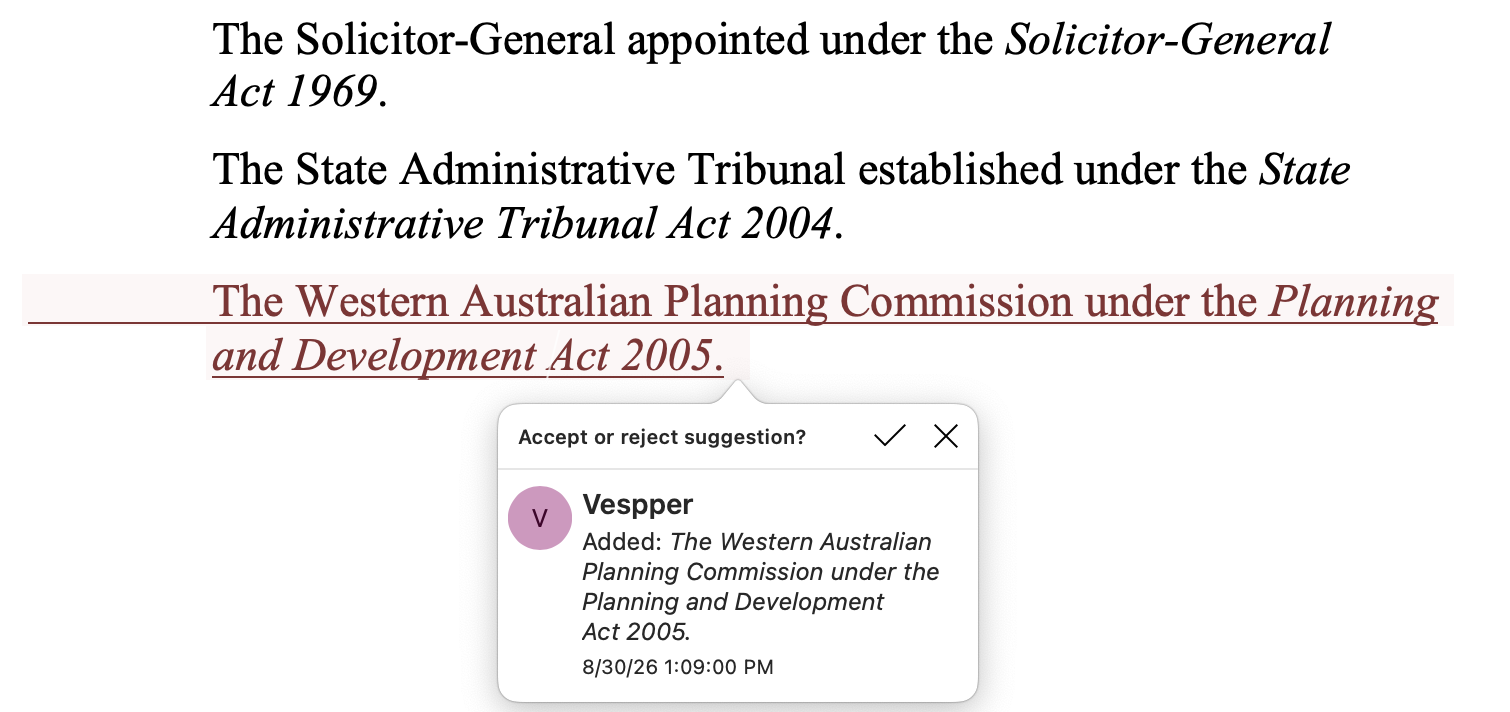
As you can see, styling is expected to be preserved. In this case, the agent is expected to use the same indentation as the other points and also to italicize the act part. Notice: we don’t tell it what styles that new content needs. We expect agents to understand that implicitly.
Scoring
During evaluation, we run a specific agent (e.g GPT 5.6 Sol + DOCX Skill) on the tasks above. Each agent run produces an output.docx, so we’re ending up with:
- original.docx
- modified.docx - the "ground truth" (i.e. how the file should look like after the requested modifications)
- output.docx - the file that was generated by the agent
Then we do the following:
- We convert each Word document to a sequence of blocks, roughly one per
<w:p>/<w:tbl>. - We align original.docx ↔ modified.docx (ground truth) to find the blocks that actually changed, then align modified.docx ↔ output.docx to see if the agent produced them. The alignment is computed using the Longest Common Subsequence algorithm.
- We compare those blocks by content and style. Content is what a reader would see (tracked changes applied). Style is the computed look after rendering (not Word's formatting XML).
Here is an interactive illustration that shows the scoring flow of a few scenarios on a specific task.
Reconciler tasks
Before we started working on the reconciler, we first defined two requirements:
- It must be accurate (preserve content, be good at styling)
- It must be extremely fast
Due to the second requirement, an agentic solution is not an option. Working on documents (e.g legal) often requires dozens if not hundreds of edits from an agent. If each edit takes 20 seconds to reconcile, that’d create a terrible experience for users.
So we framed it as a translation problem instead. The model gets a triplet - (html_old, html_new, xml_old) - and produces xml_new for that one block. No reasoning, no tool calls, no loop.
Finding xml_old isn't the model's job. We wrote a deterministic locator that maps an HTML block to its OOXML counterpart, tested separately. That keeps the search problem out of the model entirely, so it only has to do the one thing it's good at: write valid OOXML that matches an intended change.
For the model itself, we landed on the 3–8B range. Post-training runs on far smaller datasets than pretraining, so updating every parameter is wasteful. Rather than retraining billions of weights, we use Low-rank adaptation (LoRA) - a lightweight method that freezes the base model and trains a small set of "adapter" matrices alongside it. Early experiments settled us on rank 16, alpha 32, LR 2e-4, AdamW 8-bit.
The dataset is mined self-supervised from the agentic dataset: 4-tuples of (html_old, html_new, xml_old, xml_new) - plus augmentations shaped by what we saw agents are sending us in production.
The final reconciler dataset included ~16k of tasks, split 70/15/15 between train/validation/test.
Once the dataset was ready, the training was just SFT. We used Unsloth as the framework and Modal for GPUs:
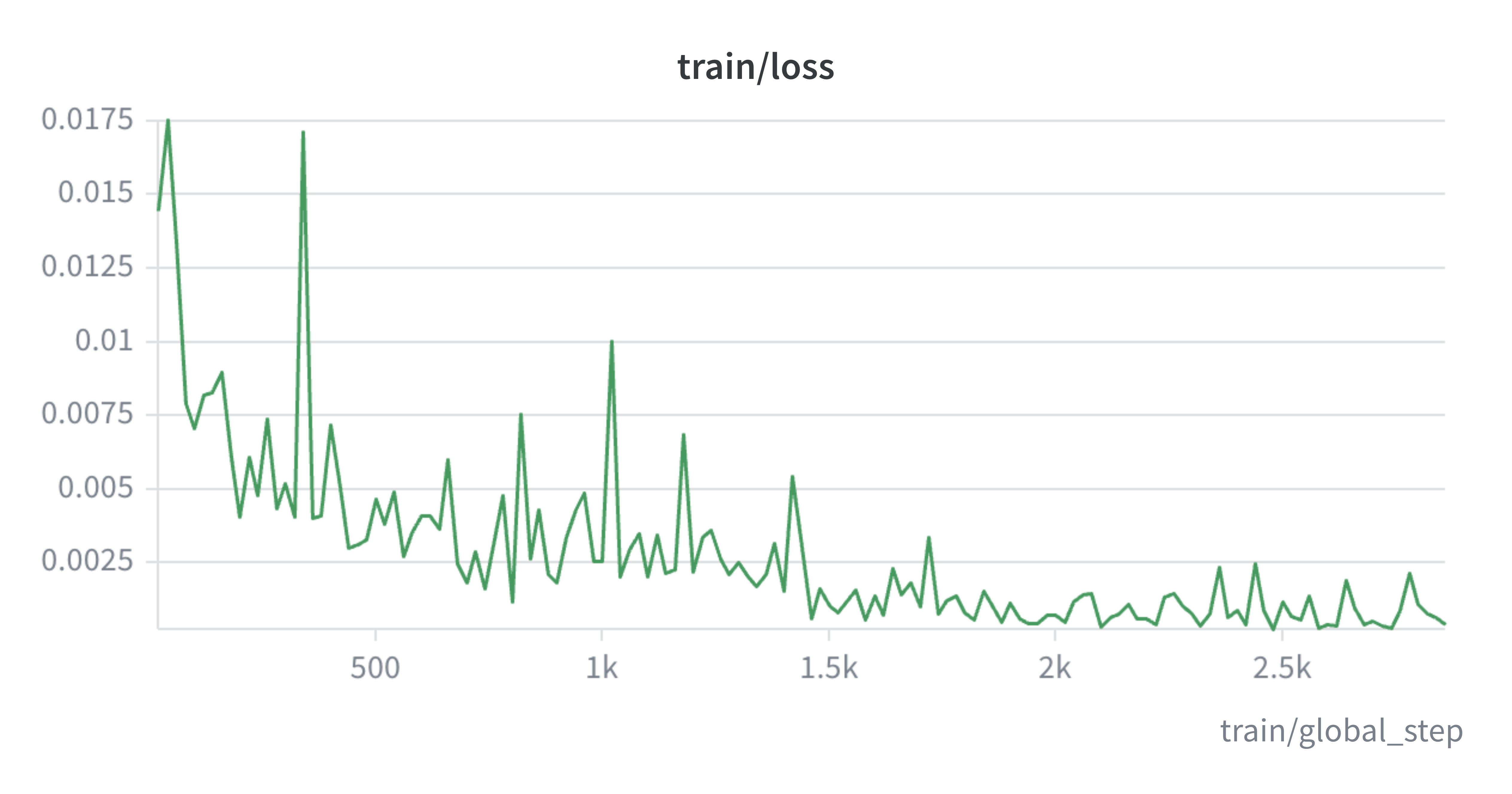
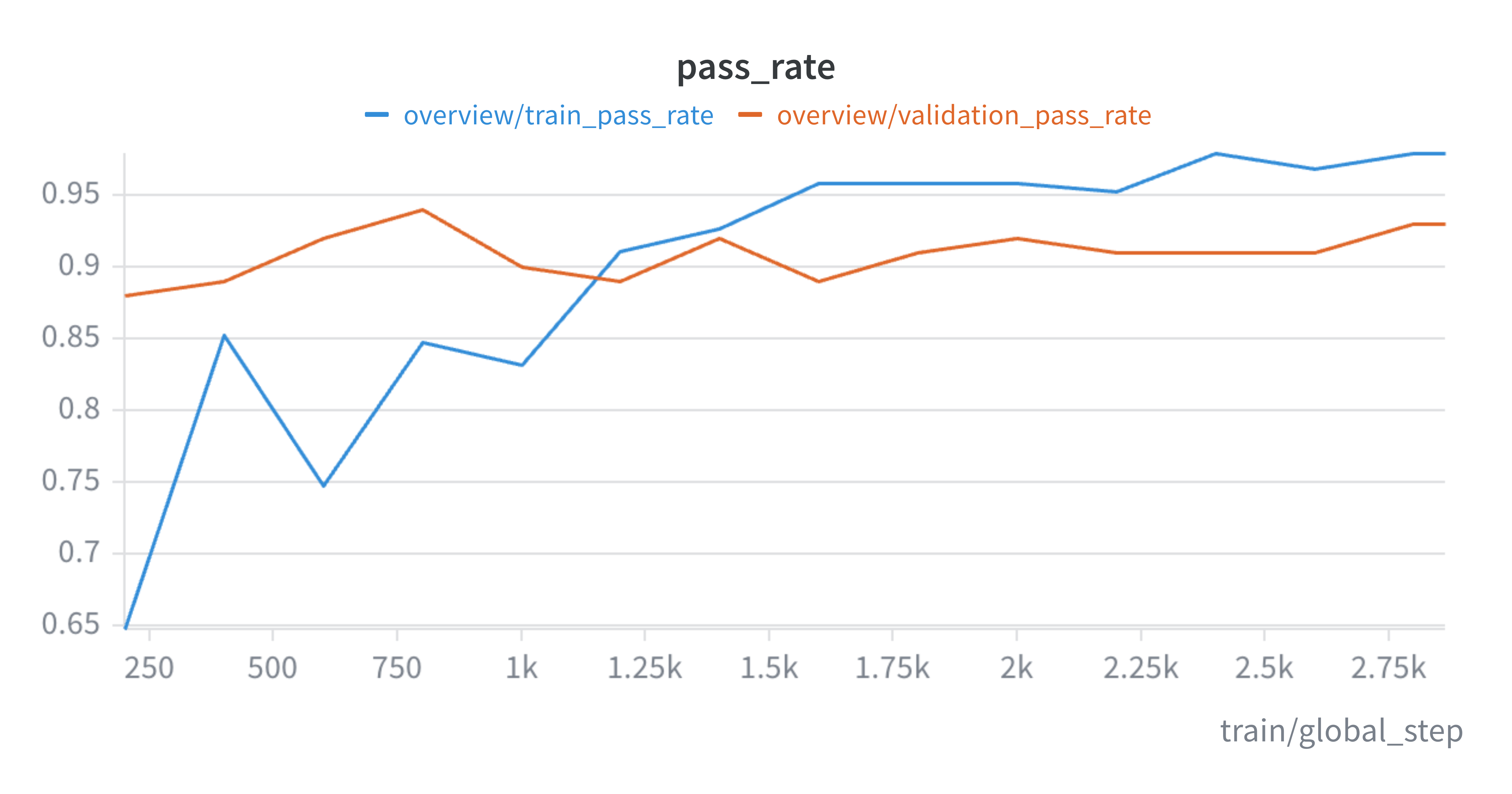
We also wanted, during training, to score the model on a metric we can understand (since loss is not very interpretable).
For that, we used a simplified version of the scoring method we mentioned above. Instead of calculating alignment between sets of blocks, we simply compare content and styles between just two blocks (the ground truth block and the output block) and compute a “passed” variable which is just a boolean.
We monitored that during training on a subset of the training set and also on our validation set and we made sure they get better over time and that there’s no overfitting:
Results
The following shows the main 4 metrics across the 6 different solutions:
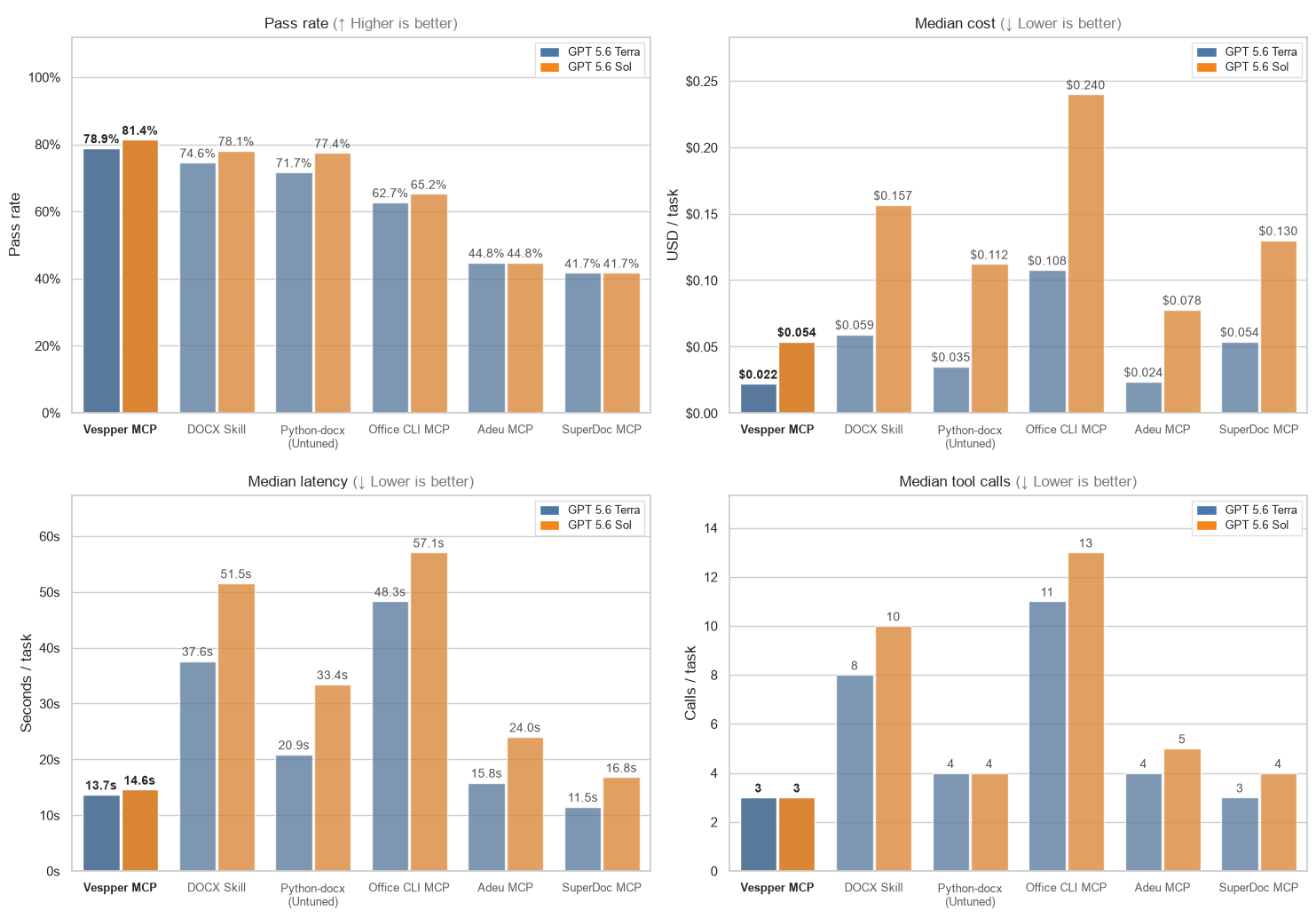
As you can see, Vespper MCP performed best overall. More specifically, Vespper is 2.7-2.9x cheaper and 2.7-3.5x faster than using the DOCX skill, while being more accurate.
Few other interesting insights:
- Generic tools such as Office CLI turned out to be really expensive and slow. GPT 5.6 Sol + Office CLI yielded ~$0.24/task and ~57s/task, which is ~4.5x more expensive and ~3.8x slower than its Vespper counterpart.
- GPT 5.6 Terra + Vespper MCP get slightly better performance than GPT 5.6 Sol + DOCX skill while being ~ 7x cheaper and ~ 3.7x faster.
We also wanted to see pass rate on different buckets of page ranges:
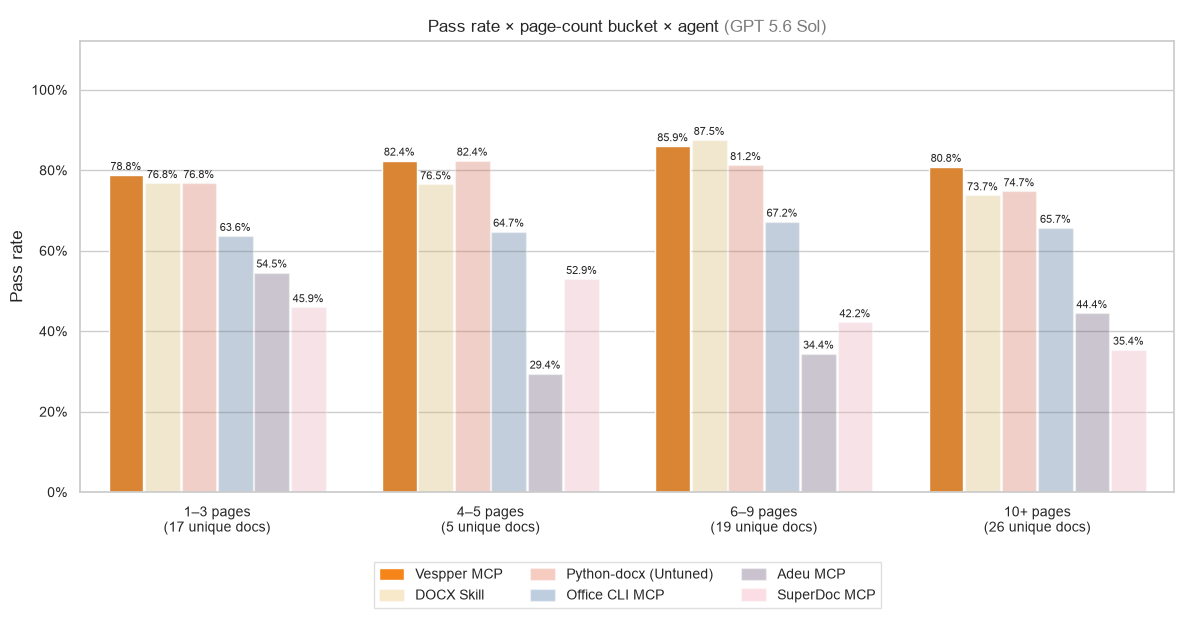
We can see that on longer documents, the Vespper MCP agent achieves stable pass rate, unlike other solutions that experience a drop to ~74% pass rate and lower.
We also wanted to see whether there’s a clear area of tasks where Vespper wins. The following table shows pass rate across 7 domains. Note: there is overlap between them (one task can edit documents, lists and tables):
Bold is the best score in that row. Groups overlap — one task can touch tables, lists, and paragraphs.
| Task group | Vespper MCP | DOCX Skill | Python-docx | Office CLI MCP | Adeu MCP | SuperDoc MCP |
|---|---|---|---|---|---|---|
| Tables (n=90) | 77.8% | 71.1% | 72.2% | 54.4% | 27.8% | 25.8% |
| Lists (n=96) | 71.9% | 70.8% | 64.6% | 51.0% | 45.8% | 34.4% |
| Paragraphs (n=159) | 75.5% | 72.3% | 71.7% | 60.4% | 40.3% | 39.6% |
| Headings (n=28) | 60.7% | 46.4% | 60.7% | 35.7% | 21.4% | 17.9% |
| Header/Footer (n=4) | 50.0% | 75.0% | 50.0% | 50.0% | 50.0% | 0.0% |
| Hyperlinks (n=8) | 25.0% | 25.0% | 25.0% | 12.5% | 12.5% | 12.5% |
| Images/Embedded Objects (n=4) | 50.0% | 50.0% | 50.0% | 25.0% | 50.0% | 25.0% |
| Tracked-change management (n=26) | 57.7% | 34.6% | 42.3% | 34.6% | 34.6% | 0.0% |
Looking at the tables, the categories with the biggest gaps are tables, tracked changes and headings.
Limitations
There are still things that Vespper MCP doesn’t support yet:
- Attach images/videos
- Support for latent styles i.e styles that are not defined in styles.xml
We are working hard to support them in upcoming versions.
Conclusions
We have shown that our approach of letting agents manipulate high-fidelity HTML abstraction, together with a good reconciler, delivers a big improvement in latency, cost and accuracy on our Word editing benchmark. These improvements unlock advanced Word editing use-cases such as fast live-editing experiences, long-horizon workloads and more. You can review Vespper pricing or follow the quickstart to connect an agent.
If you’re interested in trying Vespper DOCX MCP, you can sign up here. We’d love to work with agent builders and help their agents to edit Word documents. Our mission is to be the bridge between agents and Word.
Feel free to also send us any questions at founders@vespper.com 🙂